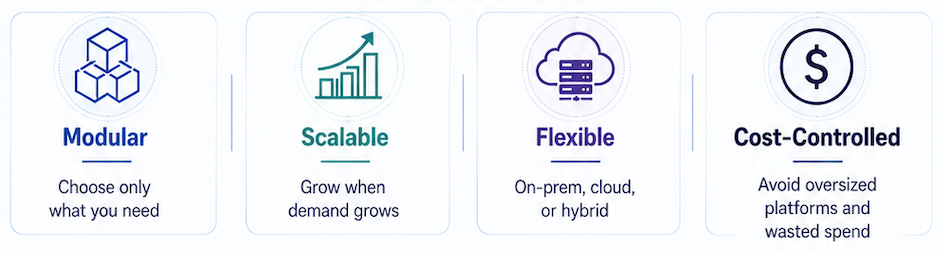
Media teams rarely overspend because they chose the wrong transcoder - they overspend because they bought the wrong size of system.
A post-production facility gets pushed toward an enterprise platform when it only needs reliable file processing. A broadcaster with steady daily work sends everything to a usage- based cloud service, then loses control of the bill. A two-channel live operation buys into an architecture built for a much larger network.
The technology may work. The cost model does not.
The cheapest system is not always the best choice, but neither is the priciest one. The answer is usually the system that matches the real workload, leaves room to grow, and avoids paying for capacity before it is needed.
That is precisely the idea behind Capella’s approach to media processing.
Start with the workload
Before choosing a platform, ask a simpler question.
What work needs to be done today?
Not what might happen in three years or what a vendor wants to sell or what looks impressive in a procurement document.
The real workload.
For file-based workflows, that might mean VOD files, archive material, mezzanine formats, broadcast deliverables, proxy creation, IMF, adaptive streaming outputs, or supply chain versions.
For live workflows, it might mean one, two, or four fixed channels. The signals are on-site. The channel count is known. The operation needs control, reliability, and clear pricing.
Those are very different requirements. They should not force the same buying decision.
The cost traps
Media processing costs rise when the system is larger than the problem.
Common traps include:
- Buying an enterprise platform for a mid-sized workflow
- Paying for features that are not used
- Putting predictable daily work into usage-based cloud services
- Buying extra capacity before there is a real operational need
- Adding complexity that operators then have to manage
None of this is theoretical. It happens when a team buys for imagined future scale rather than the workload in front of them.
However, that does not mean teams should avoid growth. It simply means growth should be paid for when it is needed.

File transcoding: start controlled, then scale.
Cambria FTC is the starting point for professional file transcoding.
It is designed for facilities that need dependable file processing without buying a larger platform than the workflow demands. It can handle VOD, archive content, broadcast files, mezzanine formats and supply chain outputs across on-prem, cloud and hybrid deployments.
For steady workloads, on-prem processing often gives better cost control than sending every job to the cloud. Cloud has value. It is useful for peaks, temporary jobs, urgent extra capacity and project work. But it should not automatically become the default for work that happens every day.
Cambria FTC is modular. A customer can add the capabilities the workflow needs: advanced codec support, Dolby processing, adaptive streaming, IMF, acceleration, watermarking or higher-resolution processing. A simpler workflow does not need to carry the cost of every advanced option.
When the workload grows, Cambria Cluster adds managed scale. Multiple FTC systems can run as a controlled transcoding environment with centralized job control, monitoring, routing and redundancy. The original investment is not replaced. It becomes part of the larger system.
For variable demand, CloudBurst adds hybrid capacity. The daily workload stays on-prem, overflow jobs move to the cloud when capacity is needed.
The pricing model matters. CloudBurst is based on source hours, not output minutes or complexity. That makes a difference when one source creates many versions, packages or adaptive bitrate outputs. Fixed monthly add-ons are available for advanced CloudBurst features, regardless of volume or node count.
That gives our customers a cleaner way to handle peaks without turning the whole workflow into an open-ended cloud bill.
Live encoding: do not start too big
Not every live operation needs a large, distributed platform.
Many organizations need a fixed number of professional live channels. They want software- based encoding running on standard hardware. They want local control with a clear route to expand later.
Cambria Stream Solo is built for that use case.
It is available in one-, two- and four-channel configurations and runs on standard hardware. It gives organizations direct control of live encoding without forcing them to start with an architecture built for a much larger operation.
That makes sense for regional services, education, corporate streaming, events, public sector media teams, contribution workflows and fixed 24/7 streams.
If the operation grows, customers can move to Cambria Stream Pro. That adds larger farm operation, more encoding nodes, cloud and hybrid live workflows, centralized control, redundancy, monitoring, alerting, and automation.
Support is part of the cost and support should not be treated as an afterthought.
A file transcoding issue can delay delivery. A live encoding fault can take a service off-air. A format problem can waste hours of engineering time.
Good support reduces cost by helping teams avoid bad configuration, poor workflow design, failed jobs and repeated troubleshooting.
Capella’s annual support is 15% of licence value. It includes major and minor updates, fixes, training, technical advice, and access to Capella’s engineering team.
Cost-effective media processing is not about buying the cheapest tool.
It is about avoiding waste: Unused features, oversized platforms, uncontrolled cloud bills. Extra capacity bought too early. Complexity that slows the team down.
Capella’s approach is simple and flexible.
Start with the workflow you have. Add scale when the workload needs it. Keep control of cost, complexity, and growth.