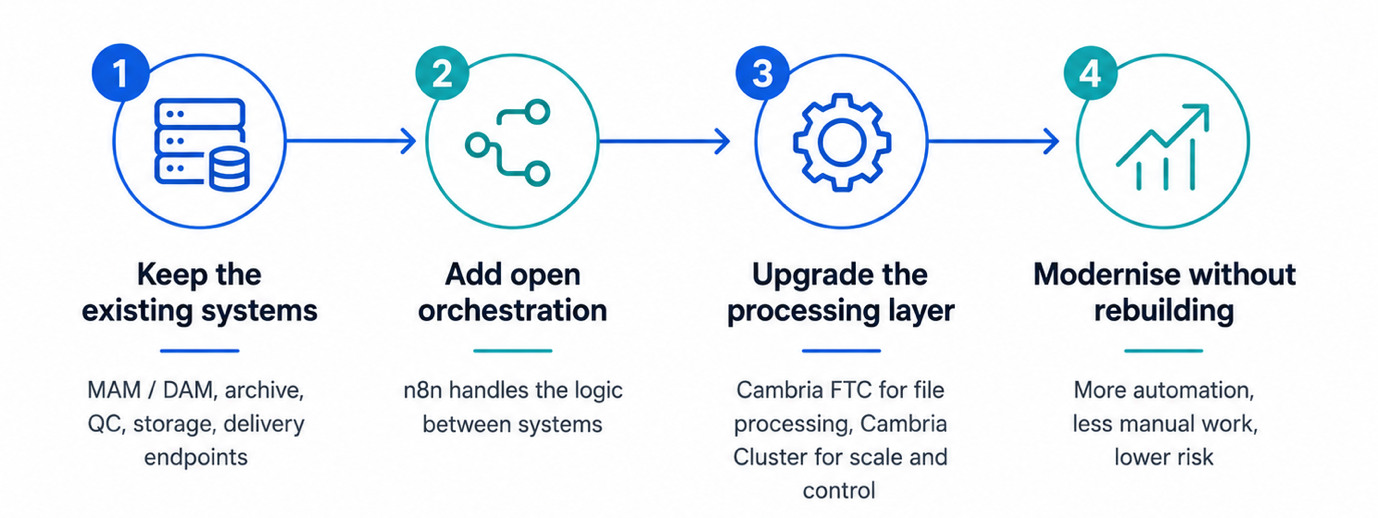
Most media companies are not starting from scratch. They already have storage, MAM or DAM systems, archive processes, QC tools, delivery requirements and operators who know how the work really gets done. The problem is usually more specific: an old transcoding layer, too much manual automation, a limited API, expensive support, awkward new formats, difficult scaling, weak reporting, or cloud processing that is possible but not cleanly connected. Operators end up doing too much of the real work outside the system, in spreadsheets, emails, watch folders and scripts.
That is when modernisation becomes necessary. But modernisation does not have to mean ripping everything out.
Legacy does not always mean bad
There is a tendency in our industry to use the word legacy as an insult. A legacy system may still be stable, well understood and connected to other systems in ways that are not fully documented but are still business-critical. It may also support formats, customer requirements or processes that newer systems do not handle as easily as the brochure suggests.
The issue is not age. It is whether the system can still support the business: handle the formats you need now, automate without heavy custom work, scale when workload increases, run where you need it to run, connect cleanly to the rest of the workflow and stay supportable as operators change.
If the answer is increasingly no, something has to change. That still does not mean the whole workflow needs to be replaced.
Replacing one locked system with another is not progress
One risk with large workflow replacement projects is that the customer simply moves from one closed environment to another. The new system may look more modern, with a cleaner interface and cloud branding. But if the customer is still forced to build everything around a single vendor’s idea of how the workflow should operate, the underlying problem has not gone away.
A better approach is to separate the processing layer from the wider workflow logic. The media processing engine should be excellent at processing: transcoding, audio, captions, standards conversion, packaging, delivery formats, watch folders, APIs, job control and distributed processing. It should not force the customer to rebuild the whole business process around it.
The workflow around the transcoder may involve a MAM, archive, cloud and local storage, QC, AI metadata, approval, billing, reporting, customer portals and operational dashboards. No single transcoder should pretend to own all of that. It should fit into it properly.
Where Cambria fits
Cambria FTC and Cambria Cluster are built for this. Cambria FTC provides the file processing layer: transcoding, standards conversion, audio workflows, packaging, delivery formats and the job logic professional media operations need. Cambria Cluster adds centralised control, scale, job management, monitoring and distributed processing across multiple machines.
Together they give the customer a modern processing layer without throwing away the systems that already work. A broadcaster may want to keep its existing MAM. A production facility may want to keep its archive process. A post house may want to keep its QC and delivery structure. A media services company may want to keep its customer portal. In those cases, the answer is not a new end-to-end platform. It is a better processing layer that connects cleanly into the workflow already in place.
The workflow engine may not be a traditional workflow engine
For years, media workflow automation meant a specialist media workflow engine. That still has a place. But these engines often move only as fast as the vendor behind them: integrations that need professional services, automation that cannot keep pace with the rest of the infrastructure, and workflows that are hard to change or troubleshoot without going back to the vendor.
Cambria FTC and Cambria Cluster now integrate with n8n, an open, visual workflow automation platform. Instead of building the automation logic inside the transcoder, the orchestration sits in n8n, above the processing layer.
n8n is widely used outside the media industry, with a large developer community, 400-plus integrations and native AI capabilities. The Community Edition is free to self-host, with the full integration library and no execution limits, so the cost sits in basic server infrastructure rather than license fees and bespoke professional-services work every time a workflow needs to change. Enterprise options add the controls larger organisations expect.
The split is straightforward. Cambria FTC scripting handles the logic inside a job. n8n handles the logic between systems. With n8n as the orchestration layer, Cambria jobs can be triggered, controlled and managed as part of wider workflows covering storage, MAM, AI services, cloud infrastructure and operational tools.
A practical example
Take a typical archive or delivery workflow. An operator finds the source file. The content is restored from archive. A transcode is submitted manually, through a watch folder or an old workflow tool. QC is run separately. Delivery files are moved by hand or by script. Reports are created outside the main system. Exceptions are handled through email, spreadsheet notes, or whatever the operator happens to know.
That may have worked for years, but it is fragile. It depends on people knowing where the weak points are. It is hard to scale, hard to hand over to new staff, hard to report on, and hard to adapt when a new customer, platform or format arrives.
A modernised version does not have to replace any of that. The archive, MAM, QC and delivery endpoints all stay; what changes is the processing and automation layer. n8n triggers the workflow the moment content is restored. Cambria FTC creates the required mezzanine, proxy, broadcast or delivery versions. Cambria Cluster manages scale. QC runs automatically, failed jobs get flagged, outputs move to the right place, and operators step in only when needed.
The same approach works in real Cambria FTC workflows. n8n can submit a source for analysis, receive the callback, check the results, flag bad files, request manual approval, select the right preset and queue the next FTC job automatically. It can also monitor recent activity and use AI to detect anomalies before alerting the operations team.
Instead of operators driving each step by hand, Cambria FTC becomes a processing node inside a wider automated flow.
Hybrid is a deployment choice, not a fixed architecture
Hybrid should mean running the work where it makes the most sense. Predictable daily volume may still belong on- premise, where processing can be controlled and cost-effective. Peak demand, temporary projects, overflow, regional delivery requirements or disaster recovery may justify cloud processing. Hybrid should fit the workflow. It should not force the customer to redesign the workflow to satisfy the architecture.
An open, API-driven processing layer makes that possible. The customer keeps the core operational model, then decides where processing should happen based on cost, urgency, capacity and control.
Modernisation should reduce risk
The best modernisation projects remove operational risk without creating a bigger migration problem. That might mean replacing an old transcoding system, adding proper cluster control, improving automation around an existing MAM, moving from manual submission to API-driven job control, or adding cloud burst capacity only for specific peaks.
Sometimes it means keeping 80 percent of the workflow and changing the 20 percent causing the problem. In most media environments, realistic is exactly what is needed.
Bring us the real workflow problem
As we head towards IBC, this is the conversation we want to have. Not the polished workflow diagram. The real one: the old system that still does an important job, the manual steps everyone tolerates, the delivery profiles nobody wants to rebuild, the support renewal that is getting harder to justify, and the business that needs to modernise without months of disruption.
Capella is not trying to replace every system in the chain. Cambria FTC and Cambria Cluster provide a strong, modern, flexible processing layer that sits inside the workflow a customer already has, making it easier to automate, scale, support and extend. Keep what works, change what is holding you back, and avoid swapping one rigid system for another.